
The Site Maintenance page is where site administrators and owners can change global site settings and run scripts to maintain their Root Beer Tag database.
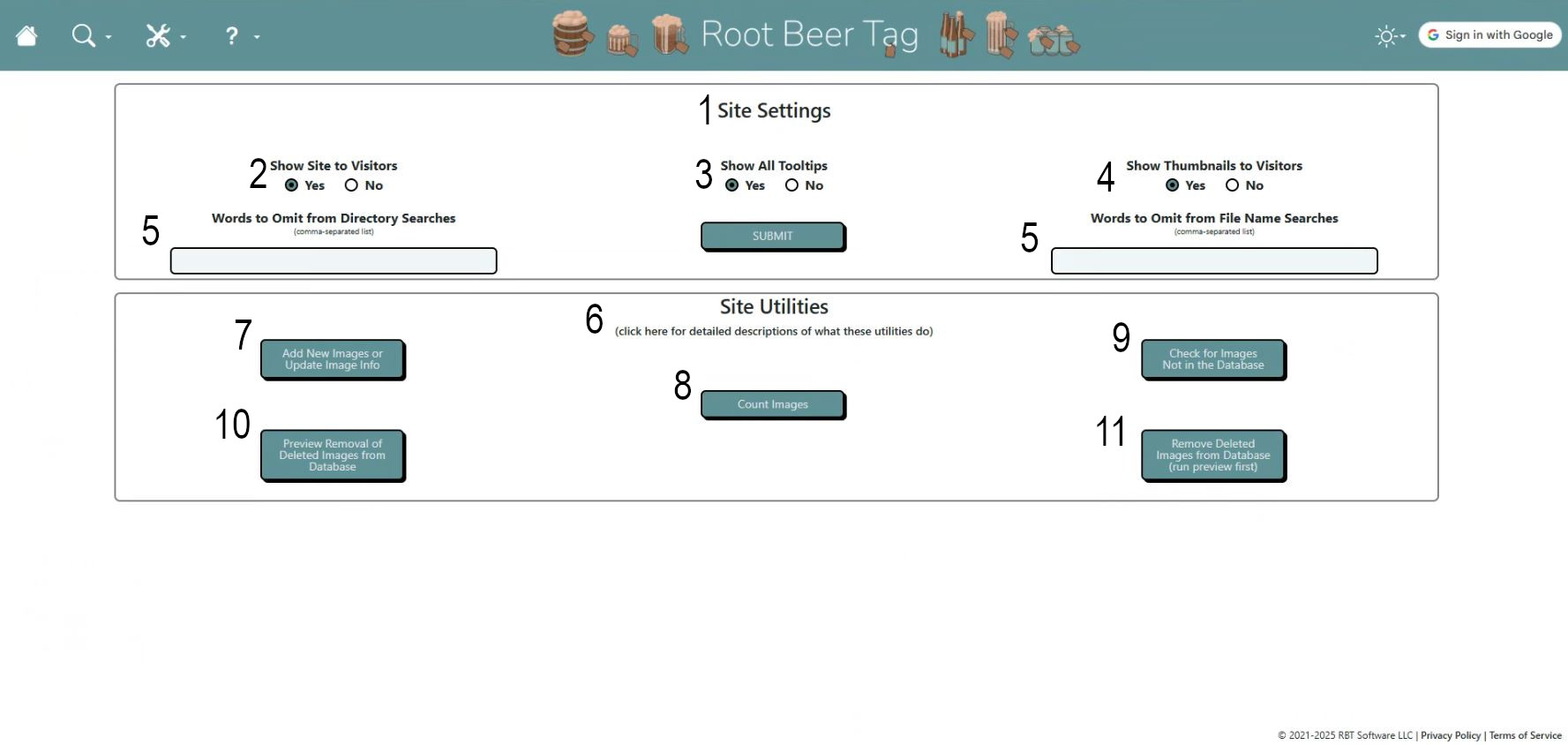
Here are a few highlights.
- The top section is a few global site settings.
- Show Site to Visitors: Toggles whether non-authenticated site visitors can see the site or are limited to a splash screen offering a Google sign-in button.
- Show All Tooltips: Toggles whether to show pop-up tooltips for most buttons across the site
- Show Thumbnails to Visitors: If visitor access is enabled, toggles whether to allow those unauthenticated site visitors access to image thumbnails. By default, this gets switched to No if the Show Site to Visitors setting is set to No.
- The last two may be a bit tricky to understand. These settings allow the omission of words or phrases in directory or file searches. Some site owners use these settings to weed out intentionally duplicated images (copies made for editing, printing, etc…).
- As an example, if Name Omission is set to “copy,” then any images containing the word “copy” in the file name will not be returned in non-tag-based searches and lists.
- Similarly, if Directory Omission is set to “printables,” then any images containing the word “printables” in any of their folder names will not be returned in non-tag-based searches and lists.
- Below the settings are five buttons that run some scripts utilities that do various tasks against the database that underlies the Root Beer Tag site. For more information beyond what is detailed below, click on the words “Site Utilities” on the Site Maintenance page for more information and examples of the output of those utilities.
- Add New Images or Update Image Info
- Launches a utility that goes through image directories on the Root Beer Tag servers and adds images to the site’s Root Beer Tag database or modifies images already in that database (new file names, new directory paths, etc).
- The utility only processes image files added or modified since the last time it was run.
- Count Images
- Launches a utility that counts the images in the Root Beer Tag database, counts images on the Root Beer Tag servers, and outputs both results.
- Check for Images Not in the Database
- Launches a utility that checks a list of images on the Root Beer Tag servers (generated weekly starting at 12:00 AM Monday morning Central Time) against a list of images in the Root Beer Tag database. If any images on the servers are not in the database, their information is displayed.
- Preview Removal of Deleted Images from Database
- Launches a utility that checks each image in the database against a list of images on the Root Beer Tag servers (generated weekly starting at 12:00 AM Monday morning Central Time). If images are in the database that have been removed from the servers, those images are listed. No further action is taken.
- Remove Deleted Images from Database
- Similar to the preview, but this utility removes the images from the database that were listed in the preview script.
- Check for Duplicate Image IDs (currently not in screenshot)
- New utility that determines whether any image IDs are attached to more than one image. Click here for more information on remediating duplicate image IDs.
If videos are more your speed, here’s a video that also explains the features of this page and how to use them.
This page last updated on 19 February 2026 by Bill Anderson